

WARNING : ONLY update holding cabinets with the most CURRENT software versions on this website!
DO NOT install previous versions of software. DOING SO, MAY RENDER THE CONTROLLER INOPERABLE.
FQ4000 Popeyes Touch Screen Fryer software for fryers manufactured PRIOR to September 2022 (see description below). DO NOT install this software on NEWER controllers with SILVER surrounds. ONLY install on controllers with BLACK WIDE PLASTIC surrounds.
Scroll to the BOTTOM of this page for software for FRYERS that have BOTH OLDER style controllers with BLACK WIDE PLASTIC surrounds AND NEWER controllers with SILVER surrounds.
OLDER Style Controller software for POPEYES FQG120T, FQG100T GAS and FQE80U ELECTRIC fryers manufactured PRIOR to SEPTEMBER 2022 with BLACK WIDE PLASTIC Touch Screen Surrounds (see photos below). If the Touch Screen surround is SILVER, (DO NOT INSTALL THE SOFTWARE IN THIS SECTION!!!!!) skip to next section below for software. If the fryer has BOTH BLACK WIDE PLASTIC Touch Screen Surrounds AND Silver Surrounds MIXED TOGETHER in the same battery, scroll to the VERY BOTTOM of this page for software that is compatible with both types of controllers.
FQG120T and FQE80U Fryers
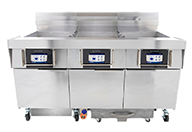
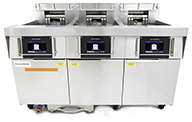
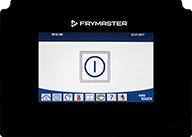
This software is ONLY for OLDER STYLE CONTROLLERS with the BLACK WIDE PLASTIC controller surround (see photo above). IT IS NOT for the newer controllers with the SILVER METAL surround.
When loading this software, check the versions of all the software on the controllers prior to updating software. If ALL the software versions match, update the software normally. If the software on ANY of the controllers DIFFER from the software on another controller, ensure the controller that matches the software verison BELOW IS NOT LOCATED in the far-left position. Swap the controllers if necessary. Disconnect the controller(s) that have the software version that MATCHES the version below. Once software is updated, reconnect the controller(s).
FQ4000 Popeye's Software Version
UIB: 15.00.049, VIB: 1.03.003, FIB: 15.00.028 and Menu File
Popeye's OQS Software Version
NOTE: This software can ONLY be loaded to a USB 2.0 drive 32gb or smaller and formatted to FAT32 through a PC or laptop. It can NOT be loaded through a tablet. The software files are in a compressed format and MUST be unzipped before copying files to a USB drive. See instructions below.
If you do not clearly understand any of the steps to download or unzip the software, or if you have any questions please call 1-800-551-8633 for assistance.
Unzipping Menu File Instructions - How to unzip and copy files to USB
FAS Software Update Instructions
MenuSync for Popeye's Software
MenuSync v15.00.014
After downloading the file, unzip the contents and keep all files in a folder. Click on setup.exe to install to your desktop.
FQ4000 POPEYES Touch Screen Fryer software for fryers manufactured AFTER AUGUST 2022 (see description below). DO NOT install this software on OLDER controller with BLACK WIDE PLASTIC surrounds. ONLY install on controllers with SILVER METAL surrounds!
Scroll to the BOTTOM of this page for software for FRYERS that have BOTH OLDER style controllers with BLACK WIDE PLASTIC surrounds AND NEWER controllers with SILVER surrounds.
NEWER Style Controller for POPEYES FQG120T, FQG100T GAS and FQE80U ELECTRIC Fryers, with the SILVER METAL surround (see photo below), manufactured AFTER AUGUST 2022. Ensure the controller has the SILVER metal surround (see photo below) and NOT the BLACK WIDE PLASTIC surround. If the Touch Screen surround is BLACK WIDE PLASTIC (DO NOT INSTALL THE SOFTWARE IN THIS SECTION!!!!!) scroll back up to the previous section for software. If the fryer has BOTH BLACK WIDE PLASTIC Touch Screen Surrounds AND Silver Surrounds MIXED TOGETHER in the same battery, scroll to the VERY BOTTOM of this page for software that is compatible with both types of controllers.
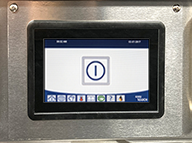
FQ4000 POPEYES Software Version
This software is ONLY for OLDER STYLE CONTROLLERS with the BLACK WIDE PLASTIC controller surround (see photo above). IT IS NOT for the newer controllers with the SILVER METAL surround.
When loading this software, check the versions of all the software on the controllers prior to updating software. If ALL the software versions match, update the software normally. If the software on ANY of the controllers DIFFER from the software on another controller, ensure the controller that matches the software verison BELOW IS NOT LOCATED in the far-left position. Swap the controllers if necessary. Disconnect the controller(s) that have the software version that MATCHES the version below. Once software is updated, reconnect the controller(s).
NOTE: This software can ONLY be loaded to a USB 2.0 drive 32gb or smaller and formatted to FAT32 through a PC or laptop. It can NOT be loaded through a tablet. The software files are in a compressed format and MUST be unzipped before copying files to a USB drive. See instructions below.
If you do not clearly understand any of the steps to download or unzip the software, or if you have any questions please call 1-800-551-8633 for assistance.
Unzipping Menu File Instructions - How to unzip and copy files to USB
FAS Software Update Instructions
MenuSync for Popeye's Software
MenuSync v15.00.014
After downloading the file, unzip the contents and keep all files in a folder. Click on setup.exe to install to your desktop.
FQ4000 Popeye's Touch Screen Fryer software for fryers that have BOTH OLDER style controllers with BLACK WIDE PLASTIC surrounds AND NEWER controllers with SILVER surrounds MIXED in the SAME battery of fryers .
Software for POPEYES FQG120T, FQG100T GAS and FQE80U ELECTRIC fryers that have BOTH BLACK WIDE PLASTIC Touch Screen Surrounds AND SILVER metal Touch Screen Surrounds (see photos below), MIXED TOGETHER in the same battery of fryers.
FQG120T and FQE80U Fryers with BOTH style of controllers installed in the same battery of fryers.
This software is ONLY for OLDER STYLE CONTROLLERS with the BLACK WIDE PLASTIC controller surround (see photo above) AND the NEWER STYLE CONTROLLERS with the SILVER METAL surround BOTH installed in the same fryer.
When loading this software, check the versions of all the software on the controllers prior to updating software. If ALL the software versions match, update the software normally. If the software on ANY of the controllers DIFFER from the software on another controller, ensure the controller that matches the software verison BELOW IS NOT LOCATED in the far-left position. Swap the controllers if necessary. Disconnect the controller(s) that have the software version that MATCHES the version below. Once software is updated, reconnect the controller(s).
FQ4000 Popeye's Software Version
UIB-C MIX: 15.00.049, VIB: 1.03.003, FIB: 15.00.028 and Menu File
Popeye's OQS Software Version
OQS OC19 File
NOTE: This software can ONLY be loaded to a USB 2.0 drive 32gb or smaller and formatted to FAT32 through a PC or laptop. It can NOT be loaded through a tablet. The software files are in a compressed format and MUST be unzipped before copying files to a USB drive. See instructions below.
If you do not clearly understand any of the steps to download or unzip the software, or if you have any questions please call 1-800-551-8633 for assistance.
Unzipping Menu File Instructions - How to unzip and copy files to USB
FAS Software Update Instructions
MenuSync for Popeye's Software
MenuSync v15.00.014
After downloading the file, unzip the contents and keep all files in a folder. Click on setup.exe to install to your desktop.

